To scan a passport for OPT, PGWP, or visa applications, place the bio page on a flat, dark surface, capture it with a mobile scanner app that supports auto edge detection, ensure all four corners and the entire MRZ (machine-readable zone) are fully visible, and export as a clear PDF or JPG within the file size limit specified by the application portal. International students typically need additional scans for I-20, I-94, EAD card, and supporting documents.
Why Passport Scans Matter for International Students
For international students applying to OPT (Optional Practical Training) in the United States or PGWP (Post-Graduation Work Permit) in Canada, the passport bio page is one of the most frequently requested documents. It also appears in nearly every visa renewal, work authorization filing, and university enrollment process.
A poorly scanned passport can trigger several application delays:
- Rejected uploads due to unreadable text or missing corners
- Manual review queues at USCIS or IRCC processing centers
- Requests for resubmission, often costing 2 to 6 weeks of processing time
For STEM OPT extension applicants, where timing aligns with the 90-day grace period, even a single resubmission can jeopardize work authorization continuity.
Common Passport Scanning Challenges
International students often encounter these recurring issues when preparing visa documents:
- Glare and shadows — overhead lighting reflects off the laminated bio page, obscuring the printed information
- Curved page edges — passports rarely lie completely flat, causing distortion at the spine
- Cropping the MRZ — the two-line code at the bottom of the bio page is essential for biometric verification, and partial captures fail automated checks
- Incorrect file formats — application portals often require PDF specifically, and reject JPG or HEIC uploads
- File size violations — USCIS Form I-765 and similar portals impose strict size caps (often 6 MB per file)
These are not document problems — they are scanning method problems.
Why CamScanner is Used for Passport & ID Scanning
CamScanner is commonly used by international students because its scanning workflow is built around the exact challenges above. Its AI-powered edge detection identifies passport boundaries automatically, even on slightly curved pages. The shadow removal and HD enhancement filters address the glare issues caused by laminated covers.
For documents that span multiple pages — such as I-20 forms, I-94 records, or EAD cards combined with passport scans — the Batch Scan mode captures everything in sequence and exports as a single PDF.
Three workflow features matter most for visa preparation:
- Format flexibility — export to PDF, JPG, or PNG depending on portal requirements
- PDF compression — reduce file size to meet USCIS/IRCC limits without losing readability
- OCR search — find specific information like passport numbers or visa expiration dates across an archive of scanned documents
How to Scan a Passport (Step-by-Step)
Follow these steps to produce a scan that passes most government and university portal requirements:
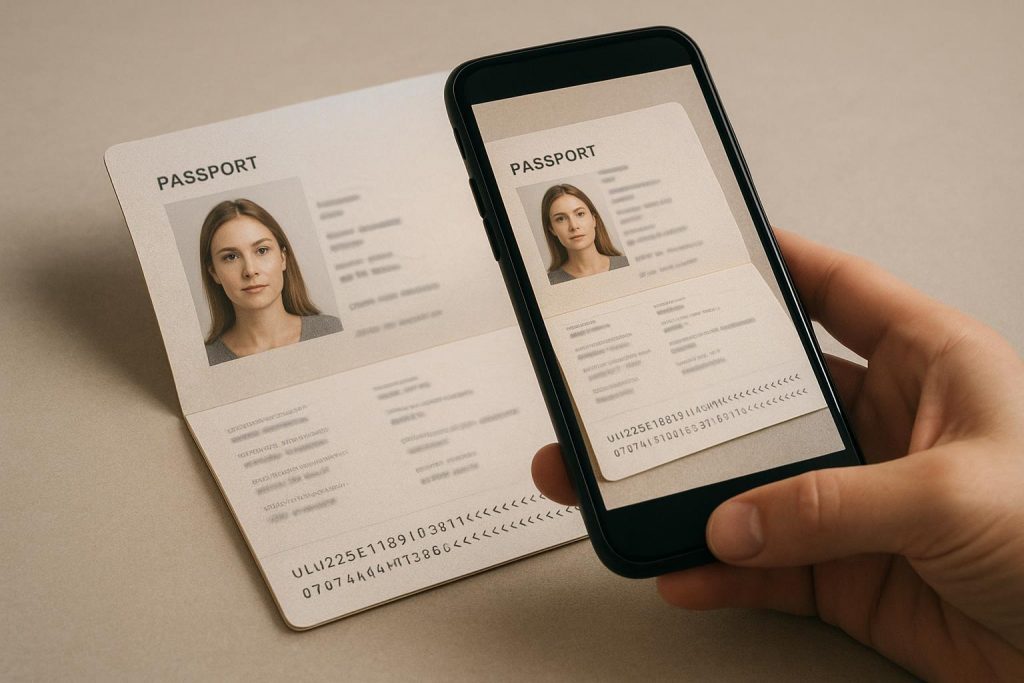
- Choose a flat, dark surface with even lighting. Avoid overhead lamps that cause glare on the laminated bio page.
- Open the passport fully and press the spine flat to minimize curvature. A book or weight on the opposite page can help.
- Position your phone directly above the document — keep the camera parallel to the page, not tilted.
- Open a scanner app with auto edge detection and align the bio page within the frame.
- Capture the image, ensuring all four corners and the full MRZ are visible.
- Apply enhancement filters to remove shadows and sharpen the text.
- Verify readability by checking that the passport number, name, date of birth, and MRZ are all clearly legible.
- Export as PDF at 300 DPI or higher.
- Compress the file if it exceeds the portal upload limit (typically 5 to 6 MB).
- Save with a clear filename like passport_bio_page_2026.pdf and store in your visa documents folder.
Other Documents to Scan for OPT and PGWP Applications
Beyond the passport bio page, international students typically need to scan and submit:
For US OPT / STEM OPT:
- I-20 (all pages with travel signatures)
- I-94 arrival/departure record
- Previous EAD cards (if applicable)
- Official transcript and letter of completion
- I-765 supporting documents
For Canadian PGWP:
- Letter of completion or final transcript (PGWP transcript PDF)
- Study permit
- Proof of program completion
- Passport bio page with most recent visa stamps
Maintaining a digital archive of these documents — scanned, named consistently, and stored in a single folder — significantly reduces processing time when application windows open.
Frequently Asked Questions
How do you scan a passport with a phone?
Place the passport on a flat, dark surface in even lighting, open a scanner app with auto edge detection, position your phone directly above the bio page, and capture an image ensuring all corners and the MRZ are visible. Export as a PDF at 300 DPI or higher.
What file format is required for passport scans on USCIS forms?
Most USCIS application portals, including Form I-765 for OPT applications, require PDF format with a file size under 6 MB per document. JPG and HEIC formats are typically not accepted.
Do I need to scan all pages of my passport for OPT?
Most OPT applications require only the passport bio page and any pages with valid US visas or entry stamps. Some scenarios — such as STEM OPT extensions — may require additional pages with travel history.
Why do passport scans get rejected?
Common rejection reasons include glare or shadows obscuring the text, cropped MRZ lines at the bottom of the bio page, low resolution that fails biometric verification, and incorrect file formats. A clean rescan usually resolves these issues.
Can I use a phone scan instead of a flatbed scanner for visa applications?
Yes, USCIS and IRCC both accept mobile-scanned documents as long as they meet resolution, format, and clarity requirements. Modern scanner apps with edge detection and enhancement filters typically produce results comparable to flatbed scanners.
Final Thoughts
For international students, a poorly scanned passport is rarely just a technical issue — it’s a multi-week delay in work authorization. The good news is that the same scanning workflow that works for passport bio pages also handles I-20, I-94, EAD cards, and academic records, meaning one well-organized digital archive supports the entire visa lifecycle.
Setting up that archive once, before application season opens, is the single highest-leverage decision an international graduate can make.