
Meta Description:
Moving involves more than transporting belongings. Learn how to scan, organize, search, protect, and share rental agreements, inspection records, receipts, utility documents, and other important moving paperwork with CamScanner.
Moving Made Easier: Keep Important Documents Organized Throughout Your Move
Moving involves much more than transporting belongings from one place to another. It also requires managing a large amount of important paperwork, including rental agreements, inspection records, payment receipts, utility documents, and address updates.
However, document management is often one of the easiest parts of a move to overlook.
A lease agreement may end up buried inside an unopened moving box. A move-in or move-out inspection checklist may be misplaced during transportation. A deposit receipt or important confirmation document may become difficult to find when it is needed most.
These documents can help confirm agreements, document property conditions, track payments, and keep important records available throughout a move.
CamScanner does not remove the complexity of moving, but it helps users keep important documents organized, searchable, and accessible throughout the process. With CamScanner, users can scan, manage, and access documents across devices throughout their move. CamScanner – Best AI PDF Scanner App, OCR & Document Management..
Before Leaving Your Old Home: Create a Complete Move-Out Record
When leaving a rental property, documenting the condition of the home is an important step for maintaining a clear record of the property’s condition.
Recording the condition of walls, floors, appliances, furniture, and other areas provides documentation that can help reduce misunderstandings later.
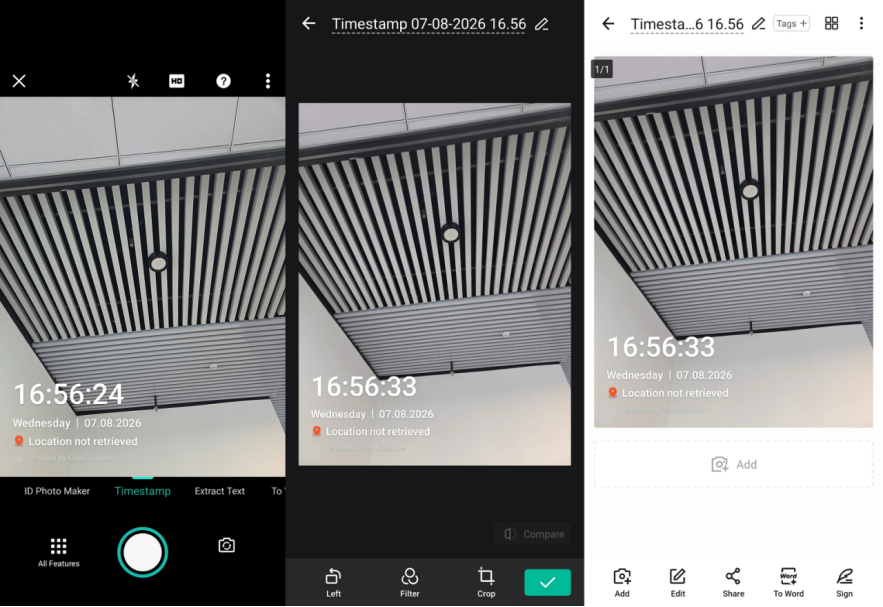
CamScanner’s Timestamp Camera feature helps users create more complete property condition records by adding date and location information directly to photos.
Users can capture:
·Overall room conditions
·Walls and flooring
·Appliances and fixtures
·Furniture and existing conditions
By combining these photos with:
·Original rental agreements
·Move-out inspection checklists
·Security deposit receipts
·Important communication records with landlords or property managers
users can create a complete digital move-out file that is easier to review and manage.
Managing Documents Throughout the Moving Process
Moving often creates a large amount of paperwork, including rental documents, property information, payment records, and administrative forms.
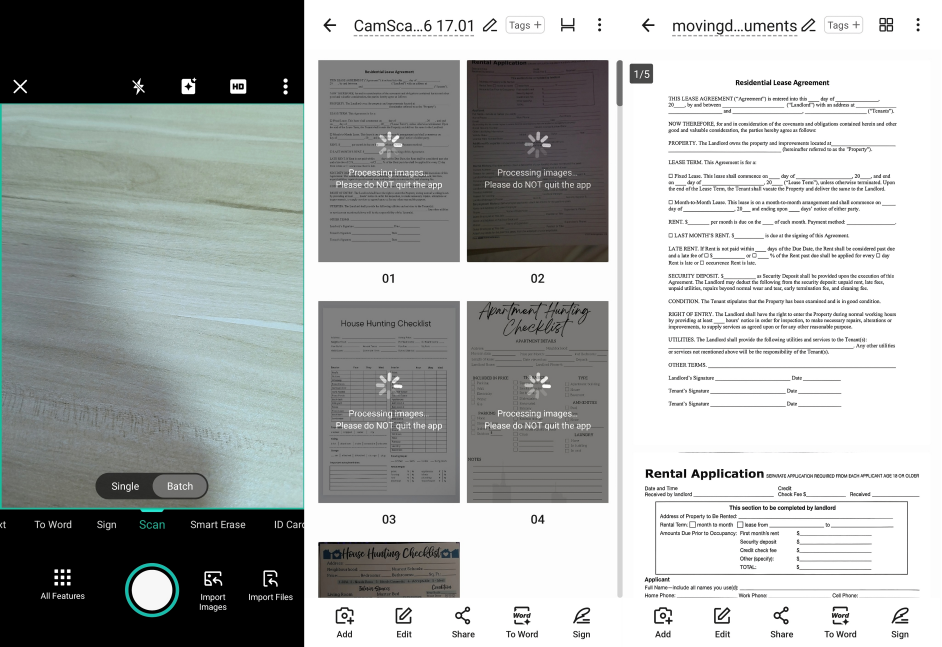
With CamScanner, users can quickly convert these physical documents into organized digital files.
Features such as:
·Batch Mode: Scan multiple documents efficiently in one session
·Auto Crop: Automatically remove unnecessary background areas
·Enhance: Improve document clarity and readability
help simplify the process of organizing important paperwork.
Documents to Save Before Moving Out
Consider digitizing:
1.Original lease agreements and addendums
2.Move-out inspection checklists
3.Property condition photos
4.Security deposit payment records
5.Important communication with landlords or property managers
Documents to Organize When Moving Into a New Home
Important files may include:
1.New rental agreements and related documents
2.Parking agreements, building rules, or HOA documents
3.Move-in inspection checklists
4.Initial property condition photos
5.Important documents provided by property management
Documents to Organize After Moving
Keep track of:
1.Utility transfer confirmations
2.Renter’s insurance or property-related insurance documents
3.Address change confirmations
4.Payment records and other important receipts
With Cloud Sync, users can keep documents organized in one place and access them across phones, tablets, and computers.
Make Moving Documents Searchable and Easier to Manage
Moving often generates a large number of documents. Keeping everything in paper form can take up space and make it difficult to locate specific information.
CamScanner’s OCR (Optical Character Recognition) technology helps convert scanned documents into searchable files.
Users can quickly find information such as:
·Specific rental agreement terms
·Property payment records
·Insurance details
·Address change documents
Instead of searching through stacks of paperwork, users can locate important information with keywords.
Protect Sensitive Moving Documents
Moving documents often contain personal information, including:
·Identification details
·Rental agreements
·Financial records
·Insurance documents
Protecting these files is essential. Official consumer guidance from the U.S. Federal Trade Commission also recommends keeping documents containing personal or financial information secure and taking care when disposing of them The Consumer Advice | Federal Trade Commission provides consumer guidance on protecting personal information and managing sensitive records..
CamScanner’s Password Protection feature helps secure sensitive documents and adds an extra layer of protection if a device is lost or shared.
Convert Document Photos into PDFs for Easier Sharing
During a move, some documents may only be available as photos, such as:
·Photos of signed forms
·Utility meter readings
·Handwritten confirmation documents
With CamScanner’s Image to PDF Tool, users can convert JPG or PNG images into shareable PDF files directly from a browser, making documents easier to store, send, and archive.
Conclusion: Keep Your Important Documents With You, Not Lost in Moving Boxes
Moving is not only about relocating belongings — it is also about reorganizing important information and documents.
With CamScanner:
·Property condition records stay organized
·Rental paperwork becomes easier to manage
·Important files become searchable
·Sensitive information receives additional protection
Digitizing paperwork helps reduce moving-related stress and ensures important documents remain secure, organized, and accessible whenever they are needed.
Frequently Asked Questions (FAQ)
1. How does CamScanner help manage moving-related documents?
CamScanner helps users scan rental agreements, inspection checklists, payment receipts, and other important documents while using OCR search, Cloud Sync, and file management features to keep everything organized.
2. How does Timestamp Camera help document property conditions?
Timestamp Camera adds date and location information to photos, helping users create clearer property condition records that can be reviewed or used as supporting documentation.
3. How can I organize many documents during a move?
Batch Mode allows users to scan multiple documents efficiently and combine them into organized PDF files, making paperwork easier to manage.
4. Is it safe to store rental agreements and sensitive documents in CamScanner?
Password Protection helps secure important files and adds an extra layer of protection for sensitive information. Users should also follow appropriate security practices for sensitive documents.
5. Can I access scanned documents on multiple devices?
Yes. Cloud Sync allows users to access and manage their files across multiple devices.
6. Can I convert document photos into PDFs?
Yes. CamScanner’s online tool can convert JPG or PNG images into PDF files without requiring the full app installation.
Sources & References
1. https://faq.usps.com/articles/Knowledge/Change-of-Address-The-Basics — United States Postal Service (USPS) — Change of Address: The Basics
2. https://www.hud.gov/faqs — U.S. Department of Housing and Urban Development (HUD) — Rental Housing FAQs and Resources
3. https://consumer.ftc.gov/consumer-alerts/2025/06/protecting-your-personal-information-which-documents-keep-which-shred — Federal Trade Commission (FTC) — Protecting Your Personal Information: Which Documents to Keep and Which to Shred
4. Articles | Consumer Advicewhat-know-about-identity-theft — Federal Trade Commission (FTC) — What To Know About Identity Theft