
Meta Description: Learn how to download your recibo de nómina from SAT, verify your CFDI, and organize salary receipts into clear PDFs with CamScanner for bank loans, rentals, and visa applications in Mexico.
Introduction
You’ve completed a bank application, submitted your INE and proof of address, and now the bank asks for your last three recibos de nómina. You search your email and phone gallery, only to find scattered screenshots, XML files, and an outdated PDF. Your income is not the problem. The challenge is having the right salary records ready in a format the institution can review.
In Mexico, a recibo de nómina is an important document for demonstrating employment income. It may be requested when applying for personal credit, renting a property, or preparing financial documents for a visa application. However, downloading a receipt from the SAT is only part of the process. You also need to understand the difference between an original electronic tax invoice and its readable PDF representation, check that the information is correct, and organize the records according to the institution’s requirements.
At CamScanner, we help make that document workflow easier. You can scan paper salary receipts, import existing PDF files, improve image clarity, combine multiple pages, and use OCR to find important information. This guide explains how to obtain your recibo de nómina through SAT, what makes a payroll CFDI valid, how to prepare a readable PDF with CamScanner, and how to keep your income records ready for different applications in Mexico.
1. What Is a Recibo de Nómina in Mexico?
A recibo de nómina is a payroll receipt that records the salary and other employment-related payments an employer makes to an employee. In Mexico, employers issue these records as electronic tax invoices known as CFDI de nómina.
It is important to distinguish between a recibo de nómina and a comprobante de ingresos. A salary receipt documents a specific payroll payment and its corresponding tax information. A comprobante de ingresos is a broader term for evidence of income, which may include salary receipts, bank statements, employment letters, or other documents accepted by the receiving institution.
For a payroll CFDI to be fiscally valid, it must meet the applicable SAT requirements. In 2026, payroll receipts follow the CFDI 4.0 standard and the Nómina 1.2 complement, Revision E, effective January 1, 2026.
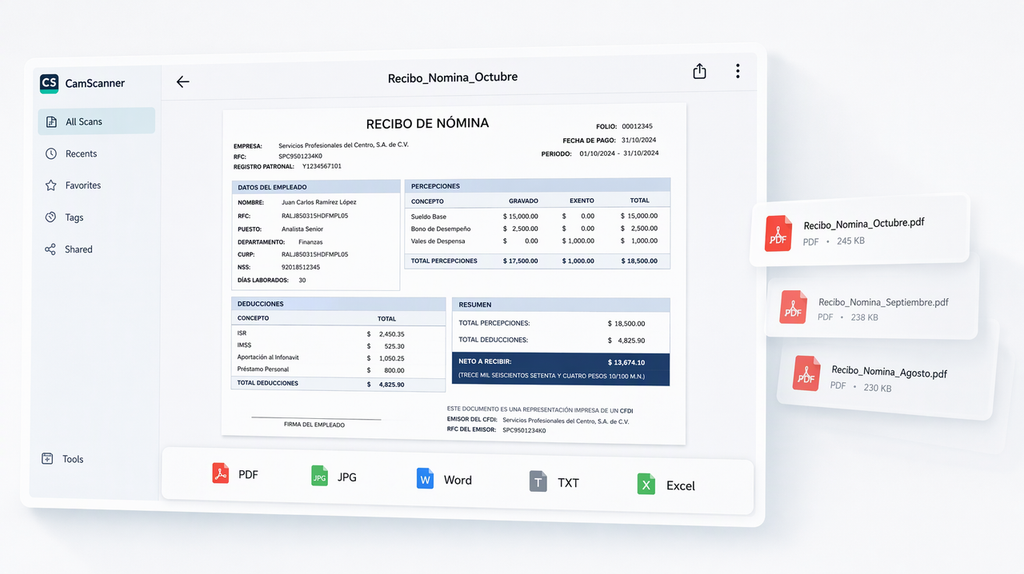
When reviewing a recibo de nómina, pay attention to the following information:
- Employer details: The employer’s legal name and RFC.
- Employee details: Your full name, RFC, and other required identification information.
- Payment period: The beginning and ending dates of the payroll period, as well as the payment date.
- Percepciones: Income received, including regular salary, bonuses, commissions, and other applicable payments.
- Deducciones: Applicable deductions, such as ISR and social security contributions.
- Net payment: The final amount paid to the employee.
- Fiscal information: The UUID, digital seals, and other information associated with the stamped CFDI.
These details help establish where the payment came from, who received it, and which period it covers.
An Excel salary summary or an informal screenshot may help explain your income, but it does not replace an officially issued payroll CFDI when fiscal documentation is required. If your employer has not issued the corresponding receipt, contact the HR or payroll department rather than trying to create a replacement yourself.
2. How to Download Your Recibo de Nómina from SAT
If you cannot find your salary receipts in your email or employer’s payroll system, you can consult the official SAT portal. Employees in Mexico can use the SAT’s payroll receipt viewer to review income and withholding information reported by their employers.
To access your records, follow these steps:
- Visit the official SAT website and open Visor de comprobantes de nómina para el trabajador.
- Select the option to start the online service.
- Log in using your RFC and valid contraseña or e.firma.
- Select the relevant tax year and review the available payroll information.
- Open the monthly or detailed CFDI view to locate individual salary payments.
- Download the available PDF reports and the corresponding XML payroll receipts.
The SAT payroll viewer provides several ways to review your records, including annual totals, employer-level information, monthly payment details, and individual CFDI information. Depending on the selected view, you can obtain PDF files, monthly Excel information, and the XML files issued by your employer.
You can also use the SAT’s electronic invoice consultation service under Trámites → Factura electrónica → Consultar, cancelar y recuperar to search for individual CFDIs by fiscal folio or issue date.
What if your salary receipt does not appear in SAT?
First, check that you have selected the correct tax year and payment period. If the receipt is still missing, contact your employer’s payroll department and ask whether the CFDI was issued and stamped correctly.
The SAT also provides information about inconsistencies in payroll records. If your employer has issued an incorrect receipt or has not issued one when required, request a correction or the missing document through the appropriate channels.
Keep in mind that the SAT portal is the place to consult the fiscal records reported by your employer. CamScanner can help you organize the documents you obtain, but it cannot retrieve missing CFDIs or replace the employer’s responsibility to issue them.
3. XML vs. PDF: Which Salary Receipt Should You Submit?
One of the most common questions when preparing a recibo de nómina PDF is whether the PDF has the same function as the original XML file.
The two formats serve different purposes:
XML: The Original Electronic Tax Document
The XML file contains the structured information of the payroll CFDI, including issuer and receiver details, payment information, fiscal identifiers, and digital seals. It is the original electronic format used for fiscal processing and verification.
Keep this file unchanged. If a bank, accountant, or authority specifically requests the original CFDI, provide the XML rather than a scanned image or an independently created PDF.
PDF: The Readable Representation
A PDF representation displays the payroll information in a format that people can easily read, review, print, and share. It is often more convenient when preparing documents for an application or keeping personal records.
However, a PDF copy is not automatically a replacement for the original XML. Scanning a printed receipt or exporting a document through CamScanner does not create a new fiscally valid CFDI.
When should you keep both formats?
The safest approach is to retain the original XML and a corresponding readable PDF representation. Use the PDF when an institution accepts a readable digital copy, and provide the XML whenever the receiving party specifically requires the original electronic tax document.
If you need to check whether a CFDI was certified by SAT, use the official verification service. You can enter the fiscal folio (UUID), issuer’s RFC, receiver’s RFC, and the required verification information. This helps confirm whether the invoice is registered in SAT’s records.
Before submitting anything, ask the receiving institution which format it accepts. A clear PDF may be convenient for an application, but the institution’s document requirements take priority.
4. How to Scan and Organize Your Recibo de Nómina PDF with CamScanner
After downloading your salary receipts, you may still need to prepare them for submission. Paper receipts can be difficult to read, while multiple monthly files can become confusing when saved without a consistent naming system.
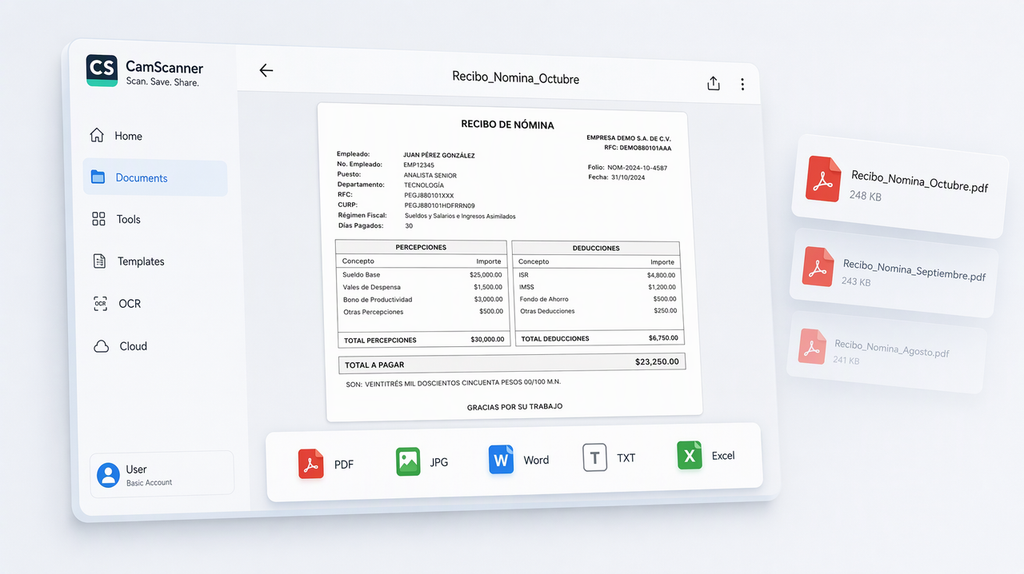
CamScanner helps you turn these records into organized digital documents that are easier to review and retrieve.
Step 1: Scan or Import Your Salary Receipts
If you have a printed recibo de nómina, open CamScanner and scan it using your phone. If you already have a PDF representation, import the existing file directly.
Whenever possible, start with the original digital PDF instead of printing and scanning it again. This helps preserve text clarity and reduces unnecessary image quality loss.
Step 2: Capture the Complete Page
When scanning a paper receipt, make sure the entire page is visible. Important information such as your name, RFC, payment period, salary breakdown, and net amount should not be cropped out.
Place the document on a flat surface with sufficient lighting. Avoid shadows, reflections, and folded corners that could make important details difficult to read.
Step 3: Improve the Scanned Document
CamScanner’s Auto Crop automatically detects document edges and helps straighten the page. Its Enhance feature can improve the readability of scanned text and document details.
Choose an appropriate enhancement setting and review the result carefully. Make sure that small characters, UUID numbers, and digital seals remain visible. If the original capture is blurry, scan the paper document again rather than relying on an unclear copy.
Step 4: Combine Multiple Monthly Receipts into One PDF
If a bank requests three consecutive months of salary receipts, you can organize the corresponding pages chronologically and use CamScanner’s PDF tools to combine them into one file.
Before exporting, review the page order and confirm that all requested months are included. A consolidated PDF makes it easier to share several receipts without sending multiple scattered attachments.
Step 5: Use OCR to Search for Important Information
When you have saved several months of payroll records, finding a particular payment period or RFC can take time.
CamScanner’s OCR technology recognizes text in scanned documents, allowing you to extract and search for relevant information in supported files. This is especially useful when maintaining a larger collection of salary receipts.
For example, you can use text recognition to help locate a document containing a particular month or employee identifier instead of manually reviewing every page.
Step 6: Export, Name, and Protect Your PDF
Export your organized document as a PDF and use a consistent file-naming format, such as:
Nomina_2026-12_APELLIDO.pdf
If the document contains personal or financial information, consider using CamScanner’s document encryption feature to protect the file with a password. Share the password separately from the document.
You can also enable Cloud Sync to keep your files synchronized and accessible across supported devices. This makes it easier to retrieve your salary receipts when another application requires proof of income.
5. What Documents Do Banks, Landlords, and Visa Applications Require?
A recibo de nómina can support different types of applications, but the number of receipts and accepted formats depend on the institution and procedure. Understanding the common requirements helps you prepare the right documents in advance.
Banks and Personal Credit Applications
Banks may request recent salary receipts to evaluate your income and repayment capacity. Three consecutive months are commonly requested in some credit application processes, although requirements vary.
In addition to your recibos de nómina, you may need an INE, proof of address, bank statements, or other financial information. Make sure your name and RFC are consistent across the documents.
INFONAVIT and Mortgage Applications
For housing-related procedures, income and employment information may be reviewed alongside other eligibility and account details. Depending on the specific service or mortgage provider, you may need salary receipts, employment information, account statements, or additional supporting documents.
Do not assume that a standard three-month payroll package is sufficient for every INFONAVIT procedure. Check the requirements for the specific application.
Rental Applications
Landlords may request one or more recent recibos de nómina to assess whether a prospective tenant has sufficient income to cover monthly rent. Some may also ask for an employment contract, references, or other proof of income.
Keeping your latest receipts together in a clearly named PDF can make it easier to respond when a landlord requests financial documentation.
Consulates and Visa Applications
Visa applications may require a comprobante de ingresos to demonstrate financial capacity. Depending on the destination country and visa category, acceptable documents may include salary receipts, bank statements, employment letters, or other financial records.
Some procedures may also require translations or certified documents. A CamScanner PDF can help you prepare a readable digital copy, but it does not replace any official translation, certification, or original-document requirement.
Before submitting your files, confirm three things with the receiving institution: how many months of income records are needed, whether PDF copies are accepted, and whether original XML files or additional supporting documents are required.
6. Common Recibo de Nómina Problems and How to Solve Them
Even after downloading and organizing your salary receipts, you may encounter issues that delay an application. Knowing how to handle them can save time and prevent repeated submissions.
Your Salary Receipt Does Not Appear in SAT
Check the selected tax year and payment period first. If the CFDI is still missing, contact your employer’s payroll department and ask whether the receipt has been issued and stamped. Do not assume that a screenshot or internal payroll statement is an adequate replacement.
You Only Have an XML File
XML is the original electronic fiscal document, but its structured format is not designed for ordinary reading. You can use an appropriate viewer or the SAT’s available services to review its information and obtain a readable representation. Keep the original XML unchanged.
Your Name or RFC Does Not Match
Compare the information on your salary receipt with your INE and other application documents. If you find an error in the issued CFDI, contact your employer to request the appropriate correction. Do not edit the scanned document to make the information appear consistent.
The Scanned PDF Is Blurry or Incomplete
Check that all page edges and important fields are visible. Use CamScanner’s Auto Crop and Enhance features to improve the scan, but return to the original paper document if any information remains unreadable.
Your Receipts Do Not Cover the Required Months
Check the dates on every receipt before combining the files. Some applications require consecutive months, while others request a different period. Arrange the pages chronologically and confirm that the selected records match the institution’s instructions.
A final review before submission can help prevent avoidable problems: check the file format, page order, document clarity, personal information, and requested date range.
7. How to Keep Your Salary Receipts Organized Throughout the Year
Preparing your recibo de nómina PDF only when a bank or landlord requests it can create unnecessary pressure. A better approach is to organize each month’s records as soon as you receive them.
Start by creating a folder for the current year and keeping the original XML files alongside their readable PDF representations. Use consistent file names that include the year, month, and employer or employee identifier where appropriate.
For example:
- Nomina_2026-01_APELLIDO.xml
- Nomina_2026-01_APELLIDO.pdf
- Nomina_2026-02_APELLIDO.xml
- Nomina_2026-02_APELLIDO.pdf
You can also create separate folders for different purposes, such as bank applications, rental documentation, and visa procedures. This helps you prepare the correct group of files without repeatedly searching through your entire document collection.
With CamScanner, you can scan paper receipts, organize PDF copies, use OCR to find information, and enable Cloud Sync to keep synchronized documents accessible across supported devices.
Remember to protect sensitive salary information. Keep original tax documents unchanged, use appropriate file security, and share only the records required for each application.
Conclusion: Keep Your Recibo de Nómina Ready Before the Next Application
A recibo de nómina is more than a monthly salary record. In Mexico, it can become an important part of a bank application, rental process, or visa procedure. Having to search through old emails, scattered screenshots, and unorganized files when someone requests proof of income can make an already demanding process more difficult.
A consistent monthly routine makes a difference. Download your payroll records, retain the original XML, prepare readable PDF copies, and organize them by month. When you need to provide three or six months of income records, you can quickly locate the right documents and prepare them for submission.
At CamScanner, we make it easier to manage these everyday documents. From scanning paper receipts and improving readability to combining pages and searching recognized text, our tools help keep your salary records organized and ready when you need them.
【Scan Documents Now】 →Frequently Asked Questions (FAQ)
Q: How can I download my recibo de nómina from SAT?
You can access the SAT’s Visor de comprobantes de nómina para el trabajador using your RFC and valid contraseña or e.firma. Select the relevant year and payment period to consult your payroll information and download the available PDF reports and XML receipts.
Q: Is a recibo de nómina PDF as valid as the original XML?
No. The XML is the original electronic CFDI file, while the PDF is a readable representation. A PDF copy may be accepted for certain administrative applications, but it does not replace the original XML when the receiving institution requires the electronic tax document.
Q: How many months of salary receipts do banks usually request?
Three consecutive months are a common request in some credit application processes. However, requirements vary by bank and product. Some institutions may request six months or additional proof of income.
Q: What should I do if my employer does not issue my recibo de nómina?
Contact your employer’s HR or payroll department and request the corresponding stamped CFDI. Employers are responsible for issuing the required payroll tax receipts. A self-created document or scanned salary summary cannot replace an officially issued CFDI.
Q: Can I use CamScanner to combine multiple salary receipts into one PDF?
Yes. You can scan or import your salary receipt pages, organize them chronologically, and use CamScanner’s PDF tools to combine them into one document. Keep the original XML files separately for fiscal verification.
Sources & References
1. SAT – Recibo de nómina (CFDI 4.0 and Nómina 1.2)
https://www.sat.gob.mx/consultas/97722/comprobante-de-nomina
2. SAT – Visor de comprobantes de nómina para el trabajador
https://wwwmat.sat.gob.mx/declaracion/97720/consulta-el-visor-de-comprobantes-de-nomina-para-el-trabajador
3. SAT – Consulta tus recibos de nómina a través del portal del SAT
https://wwwmat.sat.gob.mx/consulta/25242/consulta-tus-recibos-de-nomina-a-traves-del-portal-del-sat
4. SAT – Regla 2.7.5.2: Entrega del CFDI por concepto nómina
https://wwwmat.sat.gob.mx/articulo/75619/regla-2.7.5.2