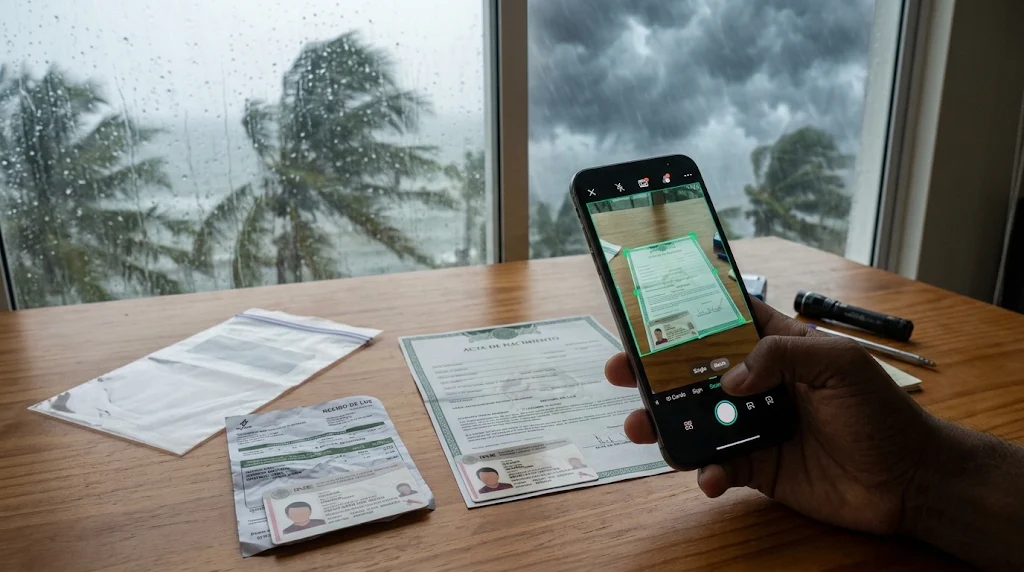
Meta Description: Prepare for hurricane season in Mexico by protecting your INE, birth certificates, insurance policies, and property records. Learn how to scan and organize important documents as PDFs with CamScanner.
Introduction
When a hurricane approaches Mexico, families often focus on securing their homes, preparing emergency supplies, and planning evacuation routes. However, protecting important documents deserves the same attention. Flooding, damaged buildings, and emergency evacuations can destroy or separate families from essential paperwork, including their INE (Credencial para Votar), birth certificates, insurance policies, and property records.
Mexico’s Pacific hurricane season officially begins on May 15, while the Atlantic season starts on June 1. Both continue through November 30. For families living in coastal areas and regions exposed to heavy rainfall, preparing important documents before a storm arrives can make subsequent administrative and recovery procedures easier.
A practical approach is to create a digital document collection before hurricane season. With CamScanner, you can digitize identification cards, scan multi-page paperwork, and export documents as PDFs. Combined with physical copies and secure offline storage, these files provide an additional way to preserve and retrieve essential information when normal services are disrupted.
1. Understand the Risks: What Happens to Important Documents During a Hurricane?
A hurricane does not have to destroy an entire home to make its paperwork inaccessible. Sometimes, a flooded storage cabinet, a damaged phone, or an unexpected evacuation is enough to separate a family from important records.
Three types of disruption are particularly relevant.
Physical damage to original documents
In areas affected by flooding or storm surges, paper documents can become wet, stained, torn, or completely unreadable. Even documents stored in ordinary folders may be damaged when water enters a home. Identification cards, property deeds, insurance contracts, and certificates can all become difficult to recover.
Limited access to administrative services
After a major storm, transportation interruptions, damaged infrastructure, or temporary office closures may delay access to government services and other institutions. Residents who need to replace identification or retrieve housing and insurance records may face additional difficulties.
Loss of access during evacuation
Families may need to leave their homes quickly, taking only essential belongings. If important paperwork remains behind, retrieving it may be impossible until authorities confirm that returning is safe.
This is why Mexico’s National Center for Disaster Prevention (CENAPRED) recommends including copies of important documents or a USB containing digital files in an emergency backpack.
The key lesson is that document protection should not depend on a single physical location. A household needs a way to preserve essential information even when its home, primary device, or internet connection becomes unavailable.
2. Build a Document Inventory: What Should You Protect First?
Before scanning everything in your home, identify which records would be most difficult to replace and which ones could be needed immediately after a disaster.
A useful way to prioritize documents is to consider three questions:
- Identity: Can you establish who you are and provide the information required for administrative procedures?
- Ownership and residence: Can you retrieve records relating to where you live and what property you own or rent?
- Recovery: Can you access the information needed to contact insurers, manage medical needs, and handle financial matters?
For Mexican households, the following documents are a practical starting point.
| Document Group | Examples | Information Worth Preserving |
| Identity records | INE, CURP, birth certificates, passports | Names, identification details, registration information |
| Residence records | Recibo de luz, recibo de agua, rental agreements | Address, account number, contract dates |
| Property records | Escrituras, property tax receipts, purchase documents | Property description, ownership details, registration information |
| Insurance records | Seguro de vivienda, health insurance policies | Policy number, coverage, exclusions, insurer contacts |
| Family records | Medical summaries, prescriptions, emergency contacts | Medical information, treatment details, contact numbers |
Give identity and insurance records particular attention.
The INE is an important identification document in Mexico. Keeping a clear copy of both sides helps preserve the information printed on the card. CURP records and birth certificates should also be included because they serve different administrative purposes.
For homeowners, property deeds and home insurance policies deserve priority. For renters, the rental agreement and recent proof of address may be more immediately relevant.
Insurance documents should be scanned completely, including pages describing coverage limitations, exclusions, deductibles, and claim procedures. A policy summary alone may not provide enough information when you need to understand what is covered after a hurricane.
You do not need to digitize every receipt or piece of household paperwork. Start with essential records, then add documents that are difficult to replace or relevant to your family’s circumstances.
3. Turn Physical Documents into Organized PDFs with CamScanner
Once your document inventory is ready, the next task is to create readable digital copies. Different document types require slightly different scanning approaches, particularly when dealing with identification cards and lengthy contracts.
Step 1: Capture Both Sides of Your INE
Open CamScanner and select ID Card Mode. Position your INE within the scanning frame and follow the on-screen instructions to capture both sides.
Pay attention to the lighting and position of the card. Avoid reflections, shadows, and blurry images that could make printed details difficult to read.
After capturing both sides, review the result carefully. Make sure the photograph, name, identification information, and other printed details are visible. Keep the scan as an unchanged reference copy.
Step 2: Digitize Multi-Page Documents
For birth certificates, property deeds, utility bills, and insurance contracts, use CamScanner’s regular document scanning function.
Auto Crop helps detect the edges of each page, while Enhance can improve readability when lighting or printing quality is not ideal.
For documents containing multiple pages, Batch Scanning allows you to capture several pages continuously instead of saving each one separately. This is particularly useful for lengthy insurance policies and property documents.
Before exporting, review the pages in sequence. Check that important information has not been cut off and that signatures, dates, policy numbers, and annexes are readable.
Step 3: Export and Arrange the Files
Export the scanned documents as PDFs. Instead of using generic filenames such as Scan001 or Document002, identify each file by its content.
For example:
- INE_FamilyMember.pdf
- CURP_FamilyMember.pdf
- Birth_Certificate.pdf
- Home_Insurance_Policy.pdf
- Property_Deed.pdf
- Rental_Agreement.pdf
You can then organize the files into folders such as:
- Identification
- Housing and Property
- Insurance and Finance
- Family and Medical Records
Keep related pages together in their original order. A complete insurance policy is more useful than several disconnected page images, especially when you need to check specific terms or conditions.
4. Create a Backup System That Works Without Electricity or Internet
Saving a PDF does not automatically mean it is safely backed up. If the only copy is on a phone that becomes damaged during flooding, the effort may be lost.
A stronger approach combines local storage, external storage, and cloud synchronization. Each method serves a different purpose.
| Backup Method | Advantages | Limitations |
| Phone storage | Quick access and offline viewing | Device may be lost, damaged, or run out of battery |
| USB drive | Portable and independent of internet access | Can be misplaced or physically damaged |
| Cloud storage | Helps access synchronized files across devices | Requires connectivity for online access and synchronization |
| Physical copies | Useful when electronic devices are unavailable | Vulnerable to water, fire, and physical damage |
Prepare for an internet outage.
Download essential PDFs to your phone before a storm approaches. Do not rely on opening documents through an online account when mobile networks or electricity may be interrupted.
Keep an external copy.
Copy important documents to a USB drive and place it in a waterproof bag. If possible, maintain another copy in a secure location outside your home. This reduces the risk of losing every backup in the same disaster.
Use Cloud Sync as an additional layer.
Enable CamScanner’s Cloud Sync before hurricane season and check that your files have synchronized successfully. This can help you retrieve documents from supported devices when your primary phone is unavailable.
Cloud synchronization is not a replacement for offline storage. It depends on connectivity for synchronization, so prepare local copies in advance.
Consider privacy as part of document protection.
An INE contains personal identification information, while insurance and financial records may contain additional sensitive details. Protect your devices and accounts with strong passwords, restrict access to trusted family members, and use CamScanner’s Password Protection for supported documents.
Avoid sharing complete identification files through public links or with unverified contacts. A backup should remain accessible to the right people without becoming unnecessarily exposed.
5. How Digital Document Copies Help After a Hurricane
The value of a document backup becomes clearer when families begin dealing with the consequences of a storm. Different situations require different records, and knowing where to find them can reduce the time spent searching through damaged paperwork.
Scenario 1: Your home has been damaged and you need to contact your insurer.
Start by locating your home insurance policy. The digital copy can help you check the policy number, insurer’s contact information, coverage details, and exclusions before reporting the damage.
If conditions are safe, photograph affected areas and preserve relevant records, including repair estimates, receipts, and communications with the insurance company. Keep these materials organized alongside your policy.
Remember that having a scanned policy does not guarantee a successful claim. The insurer may require inspections, original documents, additional evidence, or specific claim forms. The applicable requirements depend on the policy and provider.
Scenario 2: Your INE has been lost or damaged.
If your INE is lost or stolen, its scanned copy can help you retrieve the information printed on the card while preparing for the replacement procedure.
However, a PDF is not an official replacement credential. The Instituto Nacional Electoral (INE) requires applicants to follow the applicable procedure and provide the necessary supporting documents.
For example, the government procedure for replacing a lost or stolen credential without changing registered information lists a birth certificate and proof of address among its requirements. Check the current procedure and appointment instructions through the official INE website.
Scenario 3: You need to retrieve housing or residence information.
If your home becomes temporarily uninhabitable or you need to arrange alternative accommodation, your rental agreement, property records, and recent utility bills may help you retrieve important information.
These files can also make it easier to find account numbers, contract dates, addresses, and other details when communicating with landlords or utility providers.
Whether a digital copy is accepted depends on the specific institution and procedure. Keep original documents whenever possible and confirm what evidence is required.
6. Make Your Family’s Document Backup Easy to Use
A document collection is only useful during an emergency if family members know where it is stored and how to access it.
Imagine that the person who scanned all the documents is away from home when an evacuation order is issued. If nobody else knows the folder structure or has permission to access the backups, the files may be practically unavailable.
Before hurricane season, establish a simple household document-sharing arrangement.
Assign responsibility. Choose one family member to maintain the digital collection and check that important files are up to date.
Make access understandable. Use consistent folder names and descriptive filenames. Tell trusted family members where the offline copies and USB backup are kept.
Prepare a physical document pack. Place essential photocopies and relevant original documents in a waterproof bag. Keep it somewhere accessible without delaying evacuation.
Review the collection regularly. Replace outdated insurance policies, expired identification copies, old proof-of-address documents, and superseded contracts.
A useful final check is to ask another family member to locate the INE copy, insurance policy, and emergency contact information without assistance. If they can find these files quickly, your document organization is working as intended.
Conclusion
Preparing for hurricane season in Mexico means thinking beyond the immediate protection of your home. Important records such as your INE, CURP, insurance policies, and property documents can play an essential role in administrative procedures and the recovery process after a disaster.
CamScanner helps families turn physical paperwork into organized PDFs through ID Card Mode, Auto Crop, Enhance, and Batch Scanning. By combining these digital copies with offline phone storage, USB backups, Cloud Sync, and waterproof physical documents, households can build a more reliable document protection system.
Do not wait until a hurricane is approaching to start scanning. Prepare your files, check your backups, and make sure trusted family members know how to access them before an emergency occurs.
Frequently Asked Questions (FAQ)
1. What documents should Mexican families prepare before hurricane season?
Families should prioritize INE cards, CURP records, birth certificates, passports, proof of address, property documents, insurance policies, and essential medical records. The exact selection depends on household needs and circumstances.
2. Can a scanned copy of my INE replace the original?
No. A scanned PDF is a personal reference backup, not an official replacement for the physical INE. Government agencies, banks, and other institutions may require original identification or other officially accepted documents.
3. How can I scan both sides of my INE with CamScanner?
Open CamScanner, select ID Card Mode, and follow the on-screen instructions to capture the front and back. Review the result to make sure all identification details are readable.
4. Can I access CamScanner documents during an internet outage?
You can access PDFs that have already been downloaded and saved locally on your device. Cloud Sync requires an internet connection to synchronize files, so download essential documents before severe weather arrives.
5. How can I protect digital copies of my important documents?
Keep copies in multiple secure locations, including your phone, a USB drive, and cloud storage. Protect sensitive PDFs with passwords where supported, secure your accounts, and avoid sharing personal identification files through public links.
Sources & References
- https://www.gob.mx/cenapred/articulos/temporada-de-ciclones-tropicales-y-lluvias-intensas-pronostico-y-medidas-generales-de-preparacion — CENAPRED: Tropical Cyclone Season and General Preparation Measures.
- https://www.gob.mx/cenapred/es/articulos/que-articulos-debe-contener-tu-mochila-de-emergencia — CENAPRED: What Should an Emergency Backpack Contain?
- https://portal.ine.mx/reporte-por-robo-extravio-credencial/ — Instituto Nacional Electoral: Reporting a Lost or Stolen Voter Credential.